October 24th, 2025
New
Improved
Fixed
🧾 Summary
This update introduces a unified filter panel with built-in sort and refresh across all workspace modules — making navigation and data management faster than ever. The Payments workspace gets a fresh, cleaner layout with dynamic currency symbols, better filters, and clearer badges. Stability and multi-tenant security have also been improved behind the scenes.
v1.48.1
🚀 New
Advanced Filter, Sort, and Refresh Controls
Introduced a modern unified filter panel across all workspace modules — Courses, Batches, Students, Invoices, and Payments.
Added integrated sorting and refresh actions directly inside the filter panel for smoother workflows.
Enhanced filter options with:
Multi-selection support and visual badges for selected filters.
Searchable options within filters for faster access.
Dynamic icons and color-coded indicators per status (e.g., Active, Pending, Completed).
Added compact, responsive design with accessibility and tooltips.
Implemented consistent loading and visual feedback states across all actions.
Payment Module Enhancements
Upgraded the Payments workspace with a redesigned filter and improved card layout:
Introduced radio button filters for payment periods (All time, This month, Previous month) — ensuring clear single-choice selection.
Replaced hardcoded currency values with dynamic invoice currency symbols (₹, $, €, etc.) from real data.
Enhanced payment cards with:
Course/Batch badges (up to two visible with +N logic).
Simplified layout showing payment date and essential info only.
Removed irrelevant invoice-specific fields for a cleaner, more focused display.
🧠 Improved
Unified Filter Behavior:
Added
filterTypeprop to dynamically adjust between checkbox and radio-button behavior across modules.Ensures backward compatibility — only Payments use radio filters; all other modules retain their original checkbox filters.
Data Accuracy and Type Safety:
Enhanced backend data access queries to include currency, courses, and batches in payment results.
Updated TypeScript interfaces for stronger typing and consistency.
Integrated date-fns for reliable “This Month” and “Previous Month” filtering.
Refined UI/UX:
Replaced generic filter icons with modern, intuitive visuals.
Improved responsive layout handling for smaller screens.
Simplified filter hierarchy for cleaner interaction and reduced visual noise.
🧩 Fixed
Multi-Tenant Security for Invoice Operations
Invoice Update Stability
✅ Overall Impact This release delivers a major leap in workspace usability, introducing an all-in-one filter experience with built-in sort and refresh, while refining the Payments module for clarity, accuracy, and better data representation. Behind the scenes, system stability and multi-tenant security have been further strengthened, ensuring a seamless and reliable user experience.
October 23rd, 2025
New
Improved
Fixed
🚀 New
Late Fee Management & Enhanced Invoicing Experience
Introduced a complete Late Fee Management System to help institutes manage overdue invoices with greater flexibility.
Automatically applies late fees when invoices become overdue.
Add, edit, or waive late fees manually with clear dialogs and confirmation flows.
Displays contextual due date info — “Due today”, “5 days overdue”, etc.
Maintains an audit trail even after late fees are waived (set to ₹0 or equivalent).
Added intuitive “More Actions” dropdown menus and improved action button layout for better workspace organisation.
Manual status transitions are now supported for invoices:
Pending → Overdue (manual or automatic)
Pending / Overdue → Paid
Database-Level Duplicate Detection for Student Imports
Added smart duplicate detection during CSV bulk imports to prevent re-importing the same students.
Detects existing records by name and mobile number (case-insensitive).
Automatically enrols existing students only when necessary.
Adds status badges in the staging screen: Valid, Duplicate, Existing, Already Enrolled.
Improved transactional integrity and metadata handling for cleaner import results.
🧠 Improved
Currency Accuracy & Localisation
All currency displays are now fully dynamic based on organisation currency (₹, $, €, £, etc.).
Removed all hardcoded
$symbols and implemented a unified currency utility across the platform.Late fee dialogs, invoice cards, and previews now show correct symbols and formatted amounts.
Invoice UX and Data Consistency
Unified due date calculation logic across invoice cards, previews, and PDFs.
Due dates now show only for unpaid invoices to reduce clutter.
Improved overdue messaging (e.g., “Overdue yesterday”, “Overdue 3 days ago”).
Prevented blank boxes in invoice previews caused by non-course line items like late fees or carried forward amounts.
Added deduplication logic to ensure each enrolled course is displayed only once.
Student Import & Validation Enhancements
Parent details in CSV imports are now optional — validation only triggers when parent names are provided.
Prevented unnecessary validation errors for empty “Parent 2” fields.
Phone Number Normalisation
Standardised phone number storage and display with country code normalisation (e.g., +91, +1).
Added unified country data source to ensure consistency across all student and parent records.
Multi-Tenant Data Security
Strengthened data isolation between organisations to ensure complete privacy and integrity.
Enforced organisation-level access in invoices, courses, batches, and student data layers.
🧩 Fixed
Resolved issue where logging out occasionally left cached session data.
Fixed header merging issue that sometimes caused missing notifications after actions.
Corrected invoice previews showing blank “Enrolled Courses” boxes.
Fixed minor grammar and key warnings in invoice-related components.
Improved performance and error handling in bulk import operations.
✅ Overall Impact
This release delivers a more reliable and intelligent invoicing experience, with smarter late fee management, enhanced duplicate detection, and consistent data validation.
Institutes now benefit from accurate financial visibility, cleaner student imports, and improved data security across their workspace.
October 19th, 2025
New
Improved
Fixed
v1.41.2
🚀 New
Database-Level Duplicate Detection for Bulk Student Import
Added intelligent duplicate detection to prevent re-importing the same students from identical CSV files.
Detects existing students by name and mobile number (case-insensitive).
Automatically handles duplicates:
Creates new enrollments only for new students.
Skips existing or already-enrolled students gracefully.
Introduced visual status badges in the staging UI:
🟩 Valid | 🟨 Duplicate | 🟧 Existing | 🟥 Already Enrolled
Improved transactional integrity and academic metadata handling to ensure new data consistency.
Organization-Level Data Isolation (Multi-Tenant Security)
Added
organizationExternalIdfilters to all key database queries for tenant-level data isolation.Enforced organization-specific access across invoices, students, courses, batches, and dashboards.
Strengthened WorkOS-based multi-tenant boundaries, ensuring users can only access data within their organization.
🧠 Improved
Phone Number Normalization
Standardized phone number formatting across imports using country code normalization (
+prefix).Added
getCountryNameFromDialCodeutility and separatedphoneNumber/countryCodefields.Ensures consistent storage and display of phone numbers and country names for both students and parents.
Unified Country Data Source
Centralized all country data in a single shared constant (
countries.tsunder0eg-shared).Removed duplicate definitions and updated all references across student and onboarding modules.
Query Validation & Error Handling
Added robust validation to guard against invalid or non-numeric query parameters in loaders.
Prevented Prisma-related errors caused by malformed URLs or parameters.
🧩 Fixed
Session Security
Resolved logout issue where user data persisted across sessions.
Added secure cookie clearing and cache prevention for proper session termination.
Duplicate Detection
Fixed import logic to correctly handle
nullor emptylastNamevalues during duplicate checks.
Header Handling
Fixed a header merging issue that caused loss of
Set-Cookieand toast notification headers in responses.
Import Stability
Resolved academic metadata creation conflicts during bulk student imports.
✅ Overall Impact
This release delivers major upgrades in data security, import reliability, and session safety.
It enhances multi-tenant isolation, prevents accidental duplicate imports, and ensures consistent, normalized data across all records — resulting in a more secure and stable experience for organizations using EtheraGuru.
October 18th, 2025
New
Improved
Fixed
🚀 New
Bulk Student Import via CSV Upload
Introduced a powerful CSV-based bulk student import feature for batches.
Supports importing:
Student personal details
Parent/guardian relationships
Enrollment data and status
Includes server-side CSV parsing with validation, transformation, and duplicate detection.
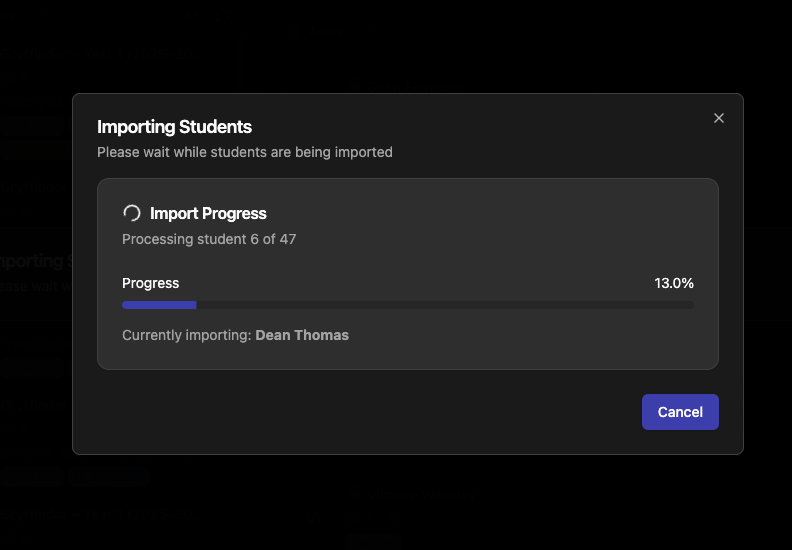
Added staging UI for data preview with progress tracking and real-time validation feedback.
Implemented transactional database operations with optimized parent lookups.
Supports text-based relationship mapping, automatic fee calculation, and status synchronization.
Modern modal flow with dynamic progress updates and concise, user-friendly design.
Restricted imports to active batches only to ensure data accuracy.
Configurable Import Limits & Guidance
Introduced configurable 50-student limit per import via
STUDENT_BULK_IMPORT_CONFIG.Added upload guidance, warning alerts, and clear validation messages to prevent oversized imports.
Server-side validation ensures oversized CSVs are gracefully rejected with actionable feedback.
Academic Metadata – School Name Field
Added conditional school name field for organizations of type Academic Tuition Centre.
Created new database table StudentAcademicMetadata linked to Student, Organization, and Branch.
Integrated school name field into:
Student add/edit forms
Student profile view (🎓 GraduationCap icon)
Bulk import CSV template and review screen
Automatically hidden for other organization types.
Updated validation schemas, types, and data access functions accordingly.
🧠 Improved
Import Workflow Enhancements
Implemented per-student progressive import with real-time progress tracking.
Added
IMPORT_SINGLE_STUDENTintent to support one-by-one import operations.Reorganized modal and upload logic for better error handling and user feedback.
Enhanced staging flow to validate both data and relationships before final commit.
Added visual feedback for upload limits and import stages.
Data Access & Validation Improvements
Strengthened input validation in all loaders (
invoices,student,batch, andworkspace).Added
Number.isFinite()checks for query parameters to prevent NaN and invalid data errors.Default fallbacks applied for invalid query strings:
Invoices → Pending (1)
Courses/Batches/Students → Active (2)
Nested Invoice Views → All (-1)
Prevented server errors from malformed URLs such as
/workspace/invoices?statusFilter=foo.
Technical Architecture
Improved separation of validation and transformation for stronger type safety.
Server-side parsing avoids browser memory issues with large CSVs.
Simplified constants and naming across import and enrollment modules.
Cleaned up unused files (e.g., removed erroneous
course-get-withplaceholder).
UI & UX Enhancements
Added progress-driven UI elements for better clarity during imports.
Updated error messages and feedback flows for improved transparency.
Streamlined design consistency across modals, lists, and import review views.
Polished form and validation feedback visuals across academic and student modules.
🧩 Fixed
CSV Gender Parsing
Fixed parsing of the gender field by switching from numeric to string-based handling.
Prevented validation errors for values like “Male” or “Female.”
Import Error Handling
Corrected the sequence of error and data handling in the bulk upload process.
Ensured validation errors display before processing valid records.
Query Parameter Crashes
Fixed potential 500 errors from invalid URL parameters across multiple loaders.
Added safe guards and default fallbacks for all workspace query strings.
✅ Overall Impact
This release introduces robust bulk student import, academic metadata support, and enhanced system resilience.
Users can now efficiently onboard multiple students, track progress in real time, and capture additional academic details — all with better stability, smarter validation, and cleaner UI workflows.
October 16th, 2025
New
Improved
Fixed
🚀 New
Workspace Filtering, Sorting & Reloading
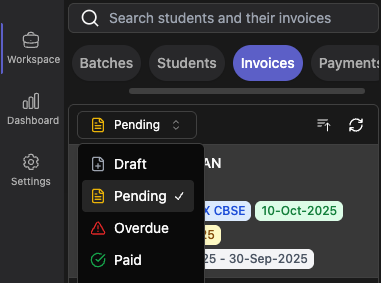
Added complete filtering, sorting, and reloading support across all workspace types — Courses, Batches, Students, and Invoices.
Introduced local filtering and sorting within nested tabs (e.g., batches under courses, students under batches).
Enabled intelligent selection clearing when filters change and current items no longer match.
Added loading indicators and improved icons for sorting, filtering, and refresh actions.
Implemented URL persistence for filter and sort states for seamless navigation.
Improved dropdown UI for filters and sorting, ensuring consistent design and behavior.
Enhanced workspace navigation and state management for a smoother user experience.
Invoices in Workspace Navigation
Added new Invoices section at
/workspace/invoices.Paginated list view with latest-first sorting, quick preview, and detailed view with actionable buttons.
Added semantic action buttons: Download (Blue), Finalize (Orange), and Paid (Green).
Displayed course/batch badges with “+N” shorthand for multiple items.
Added invoice metadata badges (period, due date, paid date).
Integrated with workspace loader for seamless performance across all sections.
🧠 Improved
Unified Workspace Experience
Standardized empty-state messages and actions across all workspaces.
Updated empty-state titles and icons (replaced
FileTextwithAcademicCapIcon).Replaced “Generate Invoice” with “Add a Course” for better clarity.
Enhanced Filtering, Sorting & Icons
Consistent filter dropdown visuals and icon usage across all modules.
Introduced intuitive sorting icons:
AArrowUp/Down → Name sorting (A–Z / Z–A)
BarsArrowUp/Down → Date sorting (Ascending / Descending)
Data Access & Logic Updates
Added
statusFilter,sortBy, andoriginalStatusparameters in all paginated list APIs.Fixed invoice status filter bug (showing incorrect “Draft” invoices as “Pending”).
Ensured filtering and sorting work uniformly across data layers and UI components.
Updated shared constants and naming conventions for consistency (
COURSE_STATUS_OPTIONS).
Dashboard & Financial Metrics
Fixed total revenue calculations to exclude draft and carried-forward invoices.
Corrected paid amount calculations to rely on invoice totals rather than payment records.
Removed Average Fee metric for clarity and cleaner dashboards.
Updated all TypeScript interfaces and data models accordingly.
UI & Theme Enhancements
Added white logo for dark mode (
logo-white.png) for improved visibility.Updated
SettingsListto automatically switch logos based on theme.Cleaned up workspace kebab menus, removing outdated options like “Generate Invoice”.
Updated timestamps and minor UI adjustments in dashboard and business modules.
🧩 Fixed
Made all workspace searches case-insensitive (students, courses, batches, invoices, payments).
Fixed nested tab filtering conflicts within workspace navigation.
Resolved dropdown styling issues and missing content in some filter menus.
Improved invoice display consistency in detail view and enrolled course sections.
General cleanup of unused imports and variables across files.
✅ Overall Impact:
This release brings major usability improvements to the EtheraGuru workspace — unified filtering, sorting, and reloading across all modules, enhanced financial accuracy, a fully functional invoice management workspace, and a smoother dark theme experience.
October 14th, 2025
New
Improved
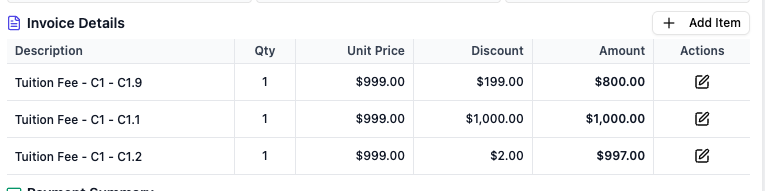
Added full CRUD operations for line items in draft invoices to enable recording of existing due amounts during student enrolment. This feature is perfect for business onboarding scenarios where students have outstanding dues from previous periods.
✨ Key Features
➕ Create new line items with custom descriptions and amounts
✏️ Edit existing line items (description, quantity, unit price, discount)
🗑️ Delete line items with confirmation dialog
🔄 Automatic invoice recalculation when line items are modified
🔒 Draft-only editing - all operations restricted to draft invoices (status 0)
🎨 Enhanced User Interface
📋 Invoice preview enhancements with "Add Item" button for draft invoices
⚙️ Edit/delete actions for each line item in draft invoices
⚡ Real-time amount calculation in forms
📱 Responsive design with Dialog (desktop) and Drawer (mobile) modals
💼 Business Impact
Enables complete financial tracking from day one by allowing users to:
📊 Add manual line items like "Outstanding dues from December 2024" with exact amounts
🎯 Record pre-enrollment amounts during student onboarding
📈 Maintain complete financial visibility and reporting accuracy
🔧 Technical Improvements
✅ Comprehensive validation schemas for all line item operations
🛡️ Enhanced TypeScript type safety across invoice management
🚀 Improved form submission handling with auto-close functionality
⚠️ Proper error handling and user feedback throughout
October 9th, 2025
New

Release Type: First Production Beta
Date: 9th October 2025
We’re thrilled to announce the first production release of EtheraGuru, our next-generation Tutoring Management System (TMS) built for modern institutes.
This Beta version introduces our core product foundation, with powerful tools to help you manage courses, batches, students, and billing—all in one place.
🆕 New
Enterprise-Grade Authentication
Secure and flexible sign-in options, including Google, Passkeys, Passwords, and Sign-in Codes.
Single Sign-On (SSO) supported for enterprise users for seamless access.Course & Batch Management
Create, edit, and organize courses with multiple batches.
Supports flexible academic or coaching models with real-time status updates.Student & Family Management
Record student details and link multiple students under a single parent/guardian account for easy family-level access and tracking.Streamlined Enrollment
Enroll students into batches with automated fee assignments, track history, and manage batch capacity effortlessly.Automated Invoicing
Configure invoice generation globally or per enrollment.
Invoices are automatically generated and marked as overdue when due dates pass.WhatsApp Notifications
Instant WhatsApp alerts for invoice generation and updates.
Parents can easily opt out or back in using STOP/START commands.Payment Recording
Manually record payments with full tracking.
Invoice statuses automatically sync with payment entries.Insights Dashboard
Real-time visibility into enrollments, payments, outstanding invoices, and overall business performance.